motioncapture.com
by OptiTrack
Motion Capture, Explained
Discover how real movement becomes digital data — and how to choose a system for the way you work.
What is motion capture?
Motion capture, or mocap, translates real-life movements of people, objects, or robots into digital data. That data can be retargeted to 3D objects or avatars for films, video games, and immersive experiences. Beyond entertainment, motion capture provides precise movement data for testing, analysis, and automation - from research labs to factory floors.
How it works · Motion data · Compare methods · Applications · Plan a system · FAQs
How optical motion capture works
OptiTrack cameras observe movement. Motive software turns those observations into usable 3D data. Explore the steps below.
Calibrated cameras observe markers from multiple views. Motive combines those views to reconstruct each marker’s position in 3D. The moving dots show the resulting marker data.
What does motion capture data show?
Points, objects and bodies tell different parts of the story.
Marker trajectories
The 3D paths of tracked points over time.
Rigid-body pose
An object’s position and orientation: six degrees of freedom, or 6DoF.
Skeleton motion
Estimated 3D positions and orientations of connected body segments, solved from tracking data using a body model.
Derived measures
Calculated quantities such as speed or joint angles.
See the movement behind the data
Motive brings camera views and a solved skeleton into one workspace. Check the observations as well as the model. Speed and joint angles are calculated from motion. To measure forces directly, add force plates or other sensors.
Export your motion capture data
- CSV: Marker positions, rigid-body pose, and skeleton motion for spreadsheets and custom analysis.
- C3D and TRC: Marker trajectories for movement analysis. C3D can also include recorded analog data.
- FBX and USD: Captured motion for compatible 3D content pipelines.
- BVH: Solved skeleton motion for character animation.
CSV and C3D are available in Motive Tracker and Body. FBX, BVH, TRC, and USD require Motive Body. Available data depends on the format and export settings.
Markers that cameras can see
Reflective markers and ActiveIO devices make movement visible in different ways. Here are two OptiTrack examples.

Passive Markers
Passive markers reflect light emitted by the camera's IR strobe back to the camera sensor. Markers of different types and sizes can be placed on a person, suit, or object. They are typically retroreflective spheres.
Blue waves illustrate infrared illumination and reflection; timing is illustrative.

ActiveIO Markers
ActiveIO combines self-identifying markers, extended tracking range, and real-time two-way communication. In patterned tracking mode, its infrared LEDs pulse in sync with camera exposures, using unique on/off sequences that let Motive identify each marker.
Red pulses illustrate infrared emission; timing is illustrative.
Compare motion capture methods
Marker-based optical, inertial, and camera-based markerless systems capture movement in different ways. This overview explains the principles behind each, including our approach to optical tracking.

Optical with markers
Multiple optical motion capture cameras reconstruct objective marker positions in 3D with submillimeter accuracy at high frame rates.
Plan for: marker placement, calibration, and clear camera views.

Inertial (IMU)
Wearable inertial sensors measure acceleration and rotation to estimate movement. Prone to drift, interference, and lack of absolute positional tracking.
Plan for: calibration, positional behavior, and the capture environment.

Markerless
Software estimates movement from camera images without attached body markers using computer vision and machine learning algorithms. Limited in accuracy and scale.
Plan for: lighting, clothing, occlusion, and task-specific validation.
People, objects, or both?
Choose your capture workflow around what you need to track.
People: Which body segments and movements do you need to solve?
Objects: What position, orientation, and reference axes does your application need?
Both: How will people, props, and other data share space and timing?
Markerless capture can also be optical. Duplex Mode supplies marker data and video simultaneously for supported workflows.
What is motion capture used for?
Explore what motion data makes possible in your field.

Animation and Performance Capture
Capture a performer’s movement for digital characters in games, film, and live experiences.

Movement Science and Biomechanics
Measure human or animal movement to support biomechanics, rehabilitation research, and sports performance analysis.

Robotics, Engineering, and Physical AI
Track robots, drones, and objects to collect reference motion for testing, research, and production applications.

Virtual Production and Broadcast
Connect a physical camera’s movement with the virtual camera, LED walls, and environment on a production stage.

Virtual Reality and Simulation/Training
Bring participants, headsets, and physical props into the same tracked digital experience.

Education and Shared Facilities
Give students and researchers a shared platform for animation, engineering, and movement analysis.
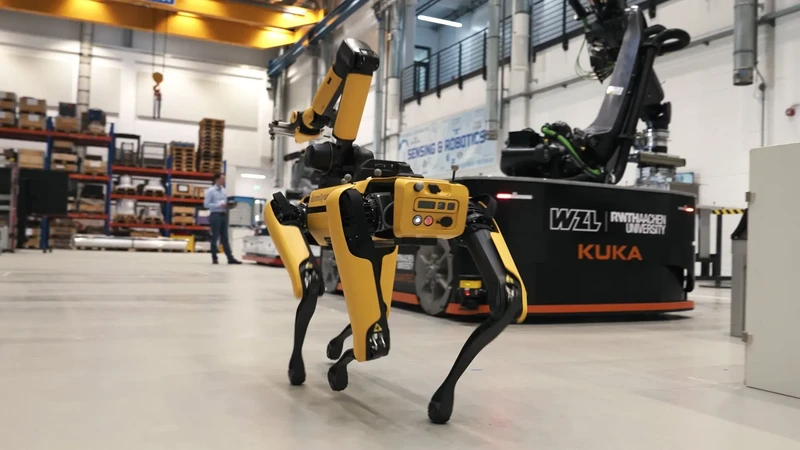
IN PRACTICE · ROBOTICS
A reference for robots in motion
At RWTH Aachen’s WZL laboratory, OptiTrack cameras and Motive motion capture software supply position data for research into mobile robots and adaptive assembly.
The team uses those measurements to refine robot movement and coordinate robots working together on the factory floor.
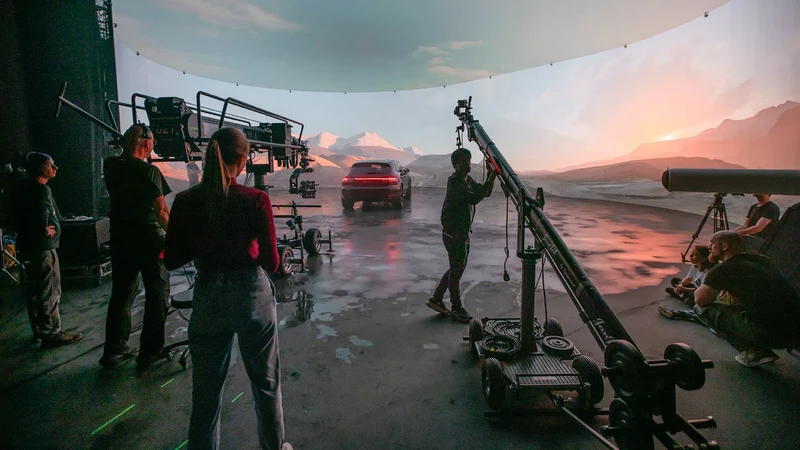
IN PRACTICE · VIRTUAL PRODUCTION
Camera tracking inside an LED volume
At Hyperbowl, optical camera tracking supports virtual production inside an LED volume.
The studio’s OptiTrack setup brings physical camera movement into demanding advertising and film workflows, using tracking cameras and a CinePuck tracking device mounted on the production camera.

IN PRACTICE · EDUCATION & RESEARCH
Motion capture for university research
At Carnegie Mellon University’s Robotics Innovation Center, 92 OptiTrack cameras equip an indoor motion capture studio and an outdoor drone cage for research into robots and human movement.
The facilities are designed to support aerial robotics, multi-robot coordination, imitation learning, and human activity modeling. Extended reality researchers also plan to use the systems to bring captured movement into virtual environments.
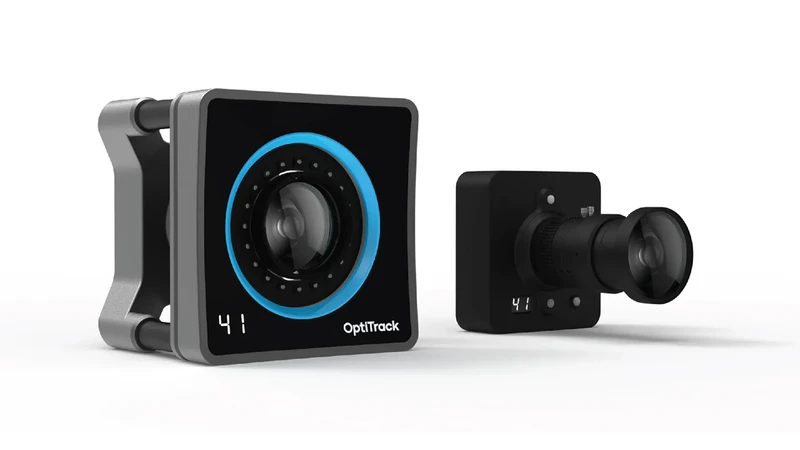
Cameras are one part of the system
An OptiTrack workflow connects five pieces:
- Cameras and lenses suited to your subjects and space.
- Markers and tracked devices for the movement you need.
- Motive software to calibrate, solve, record, and stream.
- Infrastructure for mounting, power, networking, and synchronization.
- Integrations that deliver data into your tools.
Explore OptiTrack cameras · Find software integrations
Need marker data and video together? Explore Duplex Mode for simultaneous marker tracking and video capture.

How to judge the result
Test your actual movement and inspect the output in the software where you will use it.
Output: Review marker positions reconstructed from camera measurements, solved object position and orientation, estimated skeleton motion, and calculated measures such as speed or joint angles.
Completeness: Review marker, active-device, and supported external-device recordings in Motive’s .tak files, using Edit Mode to check visibility and missing samples.
Processing: Review filtering, gap filling, reconstruction, and solving in Motive.
Timing: Motive synchronizes cameras to devices, as well as external/third party devices like Force Plates using the eSync2. The eSync2 can also intake timecode data or be used to synchronize multiple different types of devices with your system.

Start with the motion you need to capture
Bring five things to the system discussion:
- Purpose: What are you trying to capture, and why?
- Subjects: Which people or objects will you track, and what external measurements will you record?
- Space: Room dimensions, ceiling height, mounting areas, and obstructions.
- Workflow: How will you use the data, and what result do you need?
- Requirements: Precision, timing, and budget to guide camera type and count.
Plan for clear camera views throughout the motion. Room size alone does not establish usable capture coverage.
Explore System Builder · Discuss your requirements
The blue area marks the intended capture area. This is a conceptual layout; the final configuration requires a system review.
Keep exploring motion capture
Rigid-body and 6DoF tracking
See how marker layouts define an object’s position and orientation in Motive.
Plan an optical capture volume
Markerless workflows
Motion capture for movement science
Explore gait analysis, research applications, and connections to analysis tools.
Mocap suits and wear
Motion capture questions, answered
From mocap suits and camera counts to accuracy, real-time tracking, and cost, these answers explain what to consider when choosing a motion capture system for your application.
Is motion capture the same as animation?
Motion capture records or estimates movement. Animation creates movement for a digital character or scene. Captured motion can feed an animation workflow, where it is retargeted, edited, and combined with artistic work.
What is performance capture?
Performance capture commonly combines body motion with facial expression and other parts of an actor’s performance, such as voice or hand movement, for a digital character. It may use several synchronized capture systems; one tracking setup does not automatically capture every part of a performance.
Do you need a motion capture suit?
It depends on the method. Marker-based body capture needs suitable marker attachments, often supported by a dedicated garment. Full-body inertial capture uses sensors worn on the body. Markerless capture uses imagery without attached body markers. Object tracking needs an appropriate tracking arrangement rather than a body suit.
How accurate is motion capture?
Accuracy depends on the technology, system configuration, operating conditions, and what is being measured. Evaluate documented tests that match your task, then validate the proposed workflow. A camera specification alone does not establish accuracy throughout every installation.
How many motion capture cameras do I need?
The answer depends on the capture area, subjects, movement, marker size, and camera visibility throughout the task. A small object test and a multi-performer stage have different requirements. Start with your space and motion rather than choosing camera count first.
Can motion capture work in real time?
Yes. Supported systems can stream tracking data to connected applications, including interactive and virtual-production workflows. Review the complete path from capture to the application’s response, including software versions, processing, networking, and synchronization.
Can it track objects as well as people?
Yes. A suitable configuration can track the position and orientation of rigid objects such as props, cameras, or robots. The object’s size, marker arrangement, movement, and visibility affect the tracking design.
How much does a motion capture system cost?
Cost depends on hardware, camera quantity and lenses, tracking devices, software, computing, mounting, connectivity, synchronization, and services. A requirements-based proposal helps make those costs visible and avoids treating the camera purchase as the entire system.
Where can I learn even more about motion capture?
Check out our FAQ pages for more questions and answers about all things OptiTrack motion capture, including system setup and licensing.

Let’s plan your motion capture system.
Tell us what you need to track, where it happens, and how you’ll use the data. We’ll help you review a configuration for your application.